
Sunday, October 19, 2014


Thursday, September 18, 2014
Dear #WinDev and #WPDev, DevCenter is now a life time Subscription
A big news just shared by Microsoft today for all the developers in
Windows Platform. Yes, it’s for both Windows Phone and Windows
developers. Dev Center account is now a life time membership and that
means, you don’t have to renew your account every year.
If
you are a dev, you don’t want to miss this opportunity to build for any
or both the Windows platforms. Read to find out more on this topic.
Dear #WinDev and #WPDev, DevCenter is now a life time Subscription
Windows Platform. Yes, it’s for both Windows Phone and Windows
developers. Dev Center account is now a life time membership and that
means, you don’t have to renew your account every year.
If
you are a dev, you don’t want to miss this opportunity to build for any
or both the Windows platforms. Read to find out more on this topic.
Dear #WinDev and #WPDev, DevCenter is now a life time Subscription
Tuesday, December 15, 2009
InitializeError error #2104 in control 'Xaml1': Could not download the Silverlight application
Today I was working in my first Silver Light application, everything is working fine but when I upload website at server than it’s strange for me that my page was not showing properly.
Normally common starting error is “InitializeError error #2104 in control 'Xaml1': Could not download the Silverlight application. Check web server settings”
To resolve this error ,You must check in IIS if MIME Type Silverlight is inserted.
In IIS
1) Go to Site Properties -> HTTP Headers
2) Click MIME Types
3) Click New
4) Fill the follow fields:
Extension: .xap
MIME type: application/x-silverlight-app
5) Finish!

For more details you can review this article.
http://weblogs.asp.net/javiervillarreal/archive/2008/06/14/silverlight-error-2104-could-not-download-the-silverlight-application-in-iis6.aspx
Normally common starting error is “InitializeError error #2104 in control 'Xaml1': Could not download the Silverlight application. Check web server settings”
To resolve this error ,You must check in IIS if MIME Type Silverlight is inserted.
In IIS
1) Go to Site Properties -> HTTP Headers
2) Click MIME Types
3) Click New
4) Fill the follow fields:
Extension: .xap
MIME type: application/x-silverlight-app
5) Finish!

For more details you can review this article.
http://weblogs.asp.net/javiervillarreal/archive/2008/06/14/silverlight-error-2104-could-not-download-the-silverlight-application-in-iis6.aspx
Wednesday, May 6, 2009
Operator '==' incompatible with operand types 'Int32' and 'Object'
The exception occurs because anytime a ControlParameter in the WhereParameters collection (IDictionary) is null, it gets treated as type Object causing the LINQ dynamic expression parser comparison to fail.
Solution : SET LINQDataSource the property DefaultValue="0"
TableName="Documents" Where="DocumentSpecialtyID == @DocumentSpecialtyID">
Solution : SET LINQDataSource the property DefaultValue="0"
TableName="Documents" Where="DocumentSpecialtyID == @DocumentSpecialtyID">
Thursday, March 19, 2009
Transparent Shape color in Virtual Earth
Before some times I was facing problem, to show Transparent Shape color in Virtual Earth.. so Here is the solution of Transparent color in ASP.NET.
Color.FromArgb(75, 0, 128, 0);
Do not forgot to import System.Drawing Name space.
Read Best article on Recession:
Color.FromArgb(75, 0, 128, 0);
Do not forgot to import System.Drawing Name space.
Read Best article on Recession:
Wednesday, January 21, 2009
What is an Assembly
Today we are talking about assembly , Here is some good definition of Assembly so you can understand it well.
Assembly is unit of deployment like EXE or a DLL.
An assembly consists of one or more files (dlls, exe’s, html files etc.), and represents a group of resources, type definitions, and implementations of those types. An assembly may also contain references to other assemblies. These
resources, types and references are described in a block of data called a manifest.The manifest is part of the assembly, thus making the assembly self-describing.
An assembly is completely self-describing.An assembly contains metadata information, which is used by the CLR for everything from type checking and security to actually invoking the components methods. As all information is in the
assembly itself, it is independent of registry. This is the basic advantage as compared to COM where the version was stored in registry.
Multiple versions can be deployed side by side in different folders. These different versions can execute at the same time without interfering with each other. Assemblies can be private or shared. For private assembly deployment, the
assembly is copied to the same directory as the client program that references it. No registration is needed, and no fancy installation program is required. When the component is removed, no registry cleanup is needed, and no uninstall
program is required. Just delete it from the hard drive.
In shared assembly deployment, an assembly is installed in the Global Assembly Cache (or GAC). The GAC contains shared assemblies that arglobally accessible to all .NET applications on the machine.
Suggested reading in Basic .NET FrameWork
Assembly is unit of deployment like EXE or a DLL.
An assembly consists of one or more files (dlls, exe’s, html files etc.), and represents a group of resources, type definitions, and implementations of those types. An assembly may also contain references to other assemblies. These
resources, types and references are described in a block of data called a manifest.The manifest is part of the assembly, thus making the assembly self-describing.
An assembly is completely self-describing.An assembly contains metadata information, which is used by the CLR for everything from type checking and security to actually invoking the components methods. As all information is in the
assembly itself, it is independent of registry. This is the basic advantage as compared to COM where the version was stored in registry.
Multiple versions can be deployed side by side in different folders. These different versions can execute at the same time without interfering with each other. Assemblies can be private or shared. For private assembly deployment, the
assembly is copied to the same directory as the client program that references it. No registration is needed, and no fancy installation program is required. When the component is removed, no registry cleanup is needed, and no uninstall
program is required. Just delete it from the hard drive.
In shared assembly deployment, an assembly is installed in the Global Assembly Cache (or GAC). The GAC contains shared assemblies that arglobally accessible to all .NET applications on the machine.
Suggested reading in Basic .NET FrameWork
Thursday, January 15, 2009
What is project management
This topic is meant specially for .NET programmers who are looking for better position rather than simple programmer jobs. Project management is not everybody’s cup of tea. I have seen 10 year good decent technical guys do not get this position easily. But street smart programmers with average technical guys do really well. How much ever I try to cover this topic in this book.....it has so many variations that it’s really difficult to predict every scenario of project management interview. But definitely I will try to cover the basics by which you can at least get a feel of what is asked.
Project management is the discipline of planning, organizing and managing resources to bring about the successful completion of specific project goals and objectives.
A project is a finite endeavor (having specific start and completion dates) undertaken to create a unique product or service which brings about beneficial change or added value. This finite characteristic of projects stands in sharp contrast to processes, or operations, which are permanent or semi-permanent functional work to repetitively produce the same product or service. In practice, the management of these two systems is often found to be quite different, and as such requires the development of distinct technical skills and the adoption of separate management philosophy, which is the subject of this article.
The primary challenge of project management is to achieve all of the project goals and objectives while honoring the project constraints. Typical constraints are scope, time and budget. The secondary—and more ambitious—challenge is to optimize the allocation and integration of inputs necessary to meet pre-defined objectives. A project is a carefully defined set of activities that use resources (money, people, materials, energy, space, provisions, communication, motivation, etc.) to achieve the project goals and objectives.
Applying knowledge, skills, tools, techniques in project and deliver project deliverables is a short definition
Project management is the discipline of planning, organizing and managing resources to bring about the successful completion of specific project goals and objectives.
A project is a finite endeavor (having specific start and completion dates) undertaken to create a unique product or service which brings about beneficial change or added value. This finite characteristic of projects stands in sharp contrast to processes, or operations, which are permanent or semi-permanent functional work to repetitively produce the same product or service. In practice, the management of these two systems is often found to be quite different, and as such requires the development of distinct technical skills and the adoption of separate management philosophy, which is the subject of this article.
The primary challenge of project management is to achieve all of the project goals and objectives while honoring the project constraints. Typical constraints are scope, time and budget. The secondary—and more ambitious—challenge is to optimize the allocation and integration of inputs necessary to meet pre-defined objectives. A project is a carefully defined set of activities that use resources (money, people, materials, energy, space, provisions, communication, motivation, etc.) to achieve the project goals and objectives.
Applying knowledge, skills, tools, techniques in project and deliver project deliverables is a short definition
What is the relation between Classes and Objects
Our old article based on OOPS show you detail about class and object, now there is a big relationship between class and object.
They look very much same but are not same. Class is a definition, while object is a instance of the class created. Class is a blue print while objects are actual objects existing in real world. Example we have class CAR which has attributes and methods like Speed, Brakes, Type of Car etc. Class CAR is just a prototype, now we can create real time objects which can be used to provide functionality.
Example we can create a TATA car object with 100 km speed and urgent brakes.
Suggested reading in OOPS
They look very much same but are not same. Class is a definition, while object is a instance of the class created. Class is a blue print while objects are actual objects existing in real world. Example we have class CAR which has attributes and methods like Speed, Brakes, Type of Car etc. Class CAR is just a prototype, now we can create real time objects which can be used to provide functionality.
Example we can create a TATA car object with 100 km speed and urgent brakes.
Suggested reading in OOPS
What is a Managed Code
Managed code runs inside the environment of CLR i.e. .NET runtime. In short all IL are managed
code. But if you are using some third party software example VB6 or VC++ component they are
unmanaged code as .NET runtime (CLR) does not have control over the source code execution
of the language.
Suggested reading in Basic .NET FrameWork
code. But if you are using some third party software example VB6 or VC++ component they are
unmanaged code as .NET runtime (CLR) does not have control over the source code execution
of the language.
Suggested reading in Basic .NET FrameWork
Tuesday, January 13, 2009
What’s an Object
Object is a basic unit of a system. An object is an entity that has attributes, behavior, and identity. Objects are members of a class. Attributes and behavior of an object are defined by the class definition.
The object type is an alias for System.Object in the .NET Framework. You can assign values of any type to variables of type object.
Suggested reading OOPS
The object type is an alias for System.Object in the .NET Framework. You can assign values of any type to variables of type object.
Suggested reading OOPS
What is a CLS(Common Language Specification)
CLS(Common Language Specification) is a subset of the CTS which all .NET languages are expected to support. It was always a dream of Microsoft to unite all different languages in to one umbrella and CLS is one steptowards that.
Microsoft has defined CLS which are nothing but guidelines that language to follow so that it can communicate with other .NET languages in a seamless manner.
Suggested reading in Basic .NET FrameWork
For more detail about common type systemt please knock MSDN.
Microsoft has defined CLS which are nothing but guidelines that language to follow so that it can communicate with other .NET languages in a seamless manner.
Suggested reading in Basic .NET FrameWork
For more detail about common type systemt please knock MSDN.
Thursday, January 8, 2009
What is CTS (Common Type System)
In order that two language communicate smoothly CLR has CTS (Common Type System).
Example:In VB you have “Integer” and in C++ you have “long” these datatypes are not compatible so the interfacing between them is very complicated. In order to able that two different languages can communicate Microsoft introduced Common Type System. So “Integer” datatype in VB6 and “int” datatype in C++ will convert it to System.int32 which is datatype of CTS. CLS which is covered in the coming question is subset of CTS.
Understanding Common Type System in .Net Framework
For example, an integer variable in C# is written as int, whereas in Visual Basic it is written as integer. Therefore in .Net Framework you have single class called System.Int32 to interpret these variables. Similarly, for the ArrayList data type .Net Framework has a common type called System.Collections.ArrayList. In .Net Framework, System.Object is the common base type from where all the other types are derived.
This system is called Common Type System. The types in .NET Framework are the base on which .NET applications, components, and controls are built. Common Type System in .Net Framework defines how data types are going to be declared and managed in runtime. The Common Type System performs the following functions:
Note: If you have undergone COM programming period interfacing VB6 application with
VC++ application was a real pain as the datatype of both languages did not have a
common ground where they can come and interface, by having CTS interfacing is smooth.
Suggested reading in Basic .NET FrameWork
For more detail about common type systemt please knock MSDN.
Example:In VB you have “Integer” and in C++ you have “long” these datatypes are not compatible so the interfacing between them is very complicated. In order to able that two different languages can communicate Microsoft introduced Common Type System. So “Integer” datatype in VB6 and “int” datatype in C++ will convert it to System.int32 which is datatype of CTS. CLS which is covered in the coming question is subset of CTS.
Understanding Common Type System in .Net Framework
For example, an integer variable in C# is written as int, whereas in Visual Basic it is written as integer. Therefore in .Net Framework you have single class called System.Int32 to interpret these variables. Similarly, for the ArrayList data type .Net Framework has a common type called System.Collections.ArrayList. In .Net Framework, System.Object is the common base type from where all the other types are derived.
This system is called Common Type System. The types in .NET Framework are the base on which .NET applications, components, and controls are built. Common Type System in .Net Framework defines how data types are going to be declared and managed in runtime. The Common Type System performs the following functions:
- Automatically adapts itself in a framework that enables integration of multiple languages, type safety, and high performance code execution.
- Provides an object-oriented model.
- Standardizes the conventions that all the languages must follow.
- Invokes security checks.
- Encapsulates data structures.
Note: If you have undergone COM programming period interfacing VB6 application with
VC++ application was a real pain as the datatype of both languages did not have a
common ground where they can come and interface, by having CTS interfacing is smooth.
Suggested reading in Basic .NET FrameWork
For more detail about common type systemt please knock MSDN.
Tuesday, January 6, 2009
What is a Class
A class describes all the attributes of objects, as well as the methods that implement the behavior of member objects. It’s a comprehensive data type which represents a blue print of objects. It’s a template of object.
A class is simply a representation of a type of object; think of it as a blueprint that describes the object. Just as a single blueprint can be used to build multiple buildings, a class can be used to create multiple copies of an object.
A class is the core of any modern Object Oriented Programming language such as C#; most of the time, you will be writing classes. If you have a background in C or C++, many class aspects are similar, but some are different. For example, C# doesn't permit functions to exist outside the class declaration like C++; also, C# use the .NET Framework Class Library, so you have access to thousands more functions than the class libraries available to C++.
More detail about class please knock MSDN.
A class is simply a representation of a type of object; think of it as a blueprint that describes the object. Just as a single blueprint can be used to build multiple buildings, a class can be used to create multiple copies of an object.
A class is the core of any modern Object Oriented Programming language such as C#; most of the time, you will be writing classes. If you have a background in C or C++, many class aspects are similar, but some are different. For example, C# doesn't permit functions to exist outside the class declaration like C++; also, C# use the .NET Framework Class Library, so you have access to thousands more functions than the class libraries available to C++.
More detail about class please knock MSDN.
What is Multi-Tasking
It’s a feature of modern operating systems with which we can run multiple programs at same time example Word, Excel etc.
To the application developer, the advantage of multitasking is the ability to create applications that use more than one process and to create processes that use more than one thread of execution. For example, a process can have a user interface thread that manages interactions with the user (keyboard and mouse input), and worker threads that perform other tasks while the user interface thread waits for user input.
In a simple definition that running multiple task at same time called multitasking.Multitasking is the ability of an operating system to execute more than one program simultaneously. Though we say so but in reality no two programs on a single processor machine can be executed at the same time. The CPU switches from one program to the next so quickly that appears as if all of the programs are executing at the same time. Multithreading is the ability of an operating system to execute the different parts of the program, called threads, simultaneously.
Read more about multitasking at MSDN.
To the application developer, the advantage of multitasking is the ability to create applications that use more than one process and to create processes that use more than one thread of execution. For example, a process can have a user interface thread that manages interactions with the user (keyboard and mouse input), and worker threads that perform other tasks while the user interface thread waits for user input.
In a simple definition that running multiple task at same time called multitasking.Multitasking is the ability of an operating system to execute more than one program simultaneously. Though we say so but in reality no two programs on a single processor machine can be executed at the same time. The CPU switches from one program to the next so quickly that appears as if all of the programs are executing at the same time. Multithreading is the ability of an operating system to execute the different parts of the program, called threads, simultaneously.
Read more about multitasking at MSDN.
Friday, January 2, 2009
What is Common Language Runtime
Before reading about what is CLR it is necessary to know about the IL(Intermediate Language).
Read our previous article about IL(Intermediate Language)
Full form of CLR is Common Language Runtime and it forms the heart of the .NET framework.
All Languages have runtime and its the responsibility of the runtime to take care of the code
execution of the program. For example VC++ has MSCRT40.DLL,VB6 has MSVBVM60.DLL,
Java has Java Virtual Machine etc. Similarly .NET has CLR.

Following are the responsibilities of CLR
Garbage Collection :- CLR automatically manages memory thus eliminating memory leaks. When objects are not referred GC automatically releases those memories thus providing efficient memory management.
Code Access Security :- CAS grants rights to program depending on the security configuration of the machine. Example the program has rights to edit or create a new file but the security configuration of machine does not allow the program to delete a file. CAS will take care that the code runs under the environment of machines security configuration.
Code Verification :- This ensures proper code execution and type safety while the code runs. It prevents the source code to perform illegal operation such asaccessing invalid memory locations etc.
IL( Intermediate language)-to-native translators and optimizer’s :- CLR uses JIT and compiles the IL code to machine code and then executes. CLR also determines depending on platform what is optimized way of running the IL code.
The CLR allows programmers to ignore many details of the specific CPU that will execute the program. It also provides other important services, including the following:
Read our previous article about IL(Intermediate Language)
Full form of CLR is Common Language Runtime and it forms the heart of the .NET framework.
All Languages have runtime and its the responsibility of the runtime to take care of the code
execution of the program. For example VC++ has MSCRT40.DLL,VB6 has MSVBVM60.DLL,
Java has Java Virtual Machine etc. Similarly .NET has CLR.
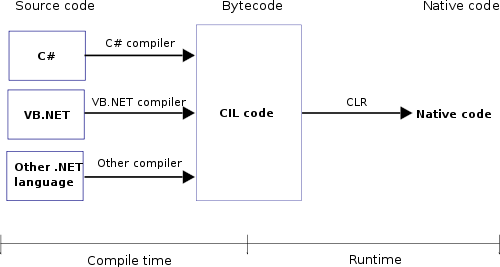
Following are the responsibilities of CLR
Garbage Collection :- CLR automatically manages memory thus eliminating memory leaks. When objects are not referred GC automatically releases those memories thus providing efficient memory management.
Code Access Security :- CAS grants rights to program depending on the security configuration of the machine. Example the program has rights to edit or create a new file but the security configuration of machine does not allow the program to delete a file. CAS will take care that the code runs under the environment of machines security configuration.
Code Verification :- This ensures proper code execution and type safety while the code runs. It prevents the source code to perform illegal operation such asaccessing invalid memory locations etc.
IL( Intermediate language)-to-native translators and optimizer’s :- CLR uses JIT and compiles the IL code to machine code and then executes. CLR also determines depending on platform what is optimized way of running the IL code.
The CLR allows programmers to ignore many details of the specific CPU that will execute the program. It also provides other important services, including the following:
- Memory management
- Thread management
- Exception handling
- Garbage collection
- Security
What is Object Oriented Programming
Hello friends here is little bit definition of Object Oriented Programming, this is a series of Object Oriented Programming we just started for you.
It is a problem solving technique to develop software systems. It is a technique to think real world in terms of objects. Object maps the software model to real world concept.
These objects have responsibilities and provide services to application or other objects.
It is a problem solving technique to develop software systems. It is a technique to think real world in terms of objects. Object maps the software model to real world concept.
These objects have responsibilities and provide services to application or other objects.
Tuesday, December 30, 2008
Create a Random Password
Some times we need to create a random password policy in our website, After some research create a class that will create a random password .We are using System.Security.Cryptography namespace in this class.
Byte[] randomBytes = new Byte[PasswordLength];
RNGCryptoServiceProvider rng = new RNGCryptoServiceProvider();
rng.GetBytes(randomBytes);
char[] chars = new char[PasswordLength];
int allowedCharCount = _allowedChars.Length;
for (int i = 0; i < PasswordLength; i++)
{
chars[i] = _allowedChars[(int)randomBytes[i] % allowedCharCount];
}
return new string(chars);
}
You can use this class as a random password generator,This is best practice to create a password policy in your application.
For more detail about System.Security.Cryptography do not forgot to knock msdn.
public static string CreateRandomPassword(int PasswordLength)
{
String _allowedChars = "abcdefghijkmnopqrstuvwxyzABCDEFGHJKLMNOPQRSTUVWXYZ23456789";Byte[] randomBytes = new Byte[PasswordLength];
RNGCryptoServiceProvider rng = new RNGCryptoServiceProvider();
rng.GetBytes(randomBytes);
char[] chars = new char[PasswordLength];
int allowedCharCount = _allowedChars.Length;
for (int i = 0; i < PasswordLength; i++)
{
chars[i] = _allowedChars[(int)randomBytes[i] % allowedCharCount];
}
return new string(chars);
}
You can use this class as a random password generator,This is best practice to create a password policy in your application.
For more detail about System.Security.Cryptography do not forgot to knock msdn.
Sunday, December 28, 2008
What is a IL(Intermediate Language)
(IL)Intermediate Language is also known as MSIL (Microsoft Intermediate Language) or CIL
(Common Intermediate Language). All .NET source code is compiled to IL. This IL is then
converted to machine code at the point where the software is installed, or at run-time by a Just-In-Time (JIT) compiler.
Microsoft Intermediate Language (MSIL) is a platform independent language that gets compiled into platform dependent executable file or dynamic link library. It means .NET compiler can generate code written using any supported languages and finally convert it to the required machine code depending on the target machine.
The main advantages of IL are:
1. IL isn't dependent on any language and there is a possibility to create applications with modules that were written using different .NET compatible
languages.
2. Platform independence - IL can be compiled to different platforms or operating systems.
A detail example is available here.
(Common Intermediate Language). All .NET source code is compiled to IL. This IL is then
converted to machine code at the point where the software is installed, or at run-time by a Just-In-Time (JIT) compiler.
Microsoft Intermediate Language (MSIL) is a platform independent language that gets compiled into platform dependent executable file or dynamic link library. It means .NET compiler can generate code written using any supported languages and finally convert it to the required machine code depending on the target machine.
The main advantages of IL are:
1. IL isn't dependent on any language and there is a possibility to create applications with modules that were written using different .NET compatible
languages.
2. Platform independence - IL can be compiled to different platforms or operating systems.
A detail example is available here.
Friday, December 26, 2008
What is SQL Injection
Today I want to show you detail of SQL Injection in a simple definition SQL Injection is "An attack technique used to exploit web sites by altering back end SQL statements through manipulating application input."
SQL injection is an attack in which malicious code is inserted into strings that are later passed to an instance of SQL Server for parsing and execution.
This are some special character in the SQL statement.
1) (;) The semicolon (;) denotes the end of one query and the start of another.
2) (--)The double hyphen (--) indicates that the rest of the current line is a comment and should be ignored.
3) (/*Some Thing Here*/) Comment delimiters. Text between /* and */ is not evaluated by the server.
4) (') Character data string delimiter.
Now how this will happen, this is important to know.
1)Suppose your page code display search record according to the user name
string userName="shakti"
SELECT * FROM TABLE1 WHERE NAME = '" + userName + "';"
This SQL code is designed to pull up the records of a specified username from its table of users. Now I am changing userName variable value one by one and check the result;
However, assume that the user enters the following:
string userName="shakti'; DROP TABLE TABLE1"
now SQL become
SELECT * FROM TABLE1 WHERE NAME = 'shakti'; DROP TABLE TABLE1
Now the result of above query in first select record according to the search criteria and then It will delete the table from the database,therefore, you must validate all user input and carefully review code that executes constructed SQL commands in the server that you are using.
Preventing SQL Injection
To protect against SQL injection, user input must not directly be embedded in SQL statements. Instead, parametrized statements must be used (preferred), or user input must be carefully escaped or filtered.
This article is based on the SQL Security that you must implement in your website.
String query = “SELECT * FROM users WHERE USERNAME= ‘“ + name + “’ PASSWORD= ‘“ + password + “’”
executeQuery(stmt);
Enter user name: 1’ OR ‘1’ = ‘1
Enter password: 1’ OR ‘1’ = ‘1
SELECT name FROM users WHERE name = ‘1’ OR ‘1’=‘1’ password = ‘1’ OR ‘1’=‘1’
What above query does ,it return a row means user is able to access our security issue without login.Seems interesting.
For security above code must be in c#
using (SqlCommand myCommand = new SqlCommand("SELECT * FROM USERS WHERE USERNAME=@username AND PASSWORD=HASHBYTES('SHA1', @password)", myConnection))
{
myCommand.Parameters.AddWithValue("@username", user);
myCommand.Parameters.AddWithValue("@password", pass);
myConnection.Open();
SqlDataReader myReader = myCommand.ExecuteReader())
...................
}
If you want to learn more about SQL Injection then please knock MSDN.
SQL injection is an attack in which malicious code is inserted into strings that are later passed to an instance of SQL Server for parsing and execution.
This are some special character in the SQL statement.
1) (;) The semicolon (;) denotes the end of one query and the start of another.
2) (--)The double hyphen (--) indicates that the rest of the current line is a comment and should be ignored.
3) (/*Some Thing Here*/) Comment delimiters. Text between /* and */ is not evaluated by the server.
4) (') Character data string delimiter.
Now how this will happen, this is important to know.
1)Suppose your page code display search record according to the user name
string userName="shakti"
SELECT * FROM TABLE1 WHERE NAME = '" + userName + "';"
This SQL code is designed to pull up the records of a specified username from its table of users. Now I am changing userName variable value one by one and check the result;
However, assume that the user enters the following:
string userName="shakti'; DROP TABLE TABLE1"
now SQL become
SELECT * FROM TABLE1 WHERE NAME = 'shakti'; DROP TABLE TABLE1
Now the result of above query in first select record according to the search criteria and then It will delete the table from the database,therefore, you must validate all user input and carefully review code that executes constructed SQL commands in the server that you are using.
Preventing SQL Injection
To protect against SQL injection, user input must not directly be embedded in SQL statements. Instead, parametrized statements must be used (preferred), or user input must be carefully escaped or filtered.
This article is based on the SQL Security that you must implement in your website.
- It is best to use stored procedure or parametrized statements.
- Never build Transact-SQL statements directly from user input.
- Input data must be in correct format.
- The “sa” account or other privileged accounts that are members of the “sysadmin” or “db_owner” roles are not used for application logins.
- Connection string must be encrypted and must be stored in a secure location.
- Try to use multi layer project,based on business logic and other security classes.
String query = “SELECT * FROM users WHERE USERNAME= ‘“ + name + “’ PASSWORD= ‘“ + password + “’”
executeQuery(stmt);
Enter user name: 1’ OR ‘1’ = ‘1
Enter password: 1’ OR ‘1’ = ‘1
SELECT name FROM users WHERE name = ‘1’ OR ‘1’=‘1’ password = ‘1’ OR ‘1’=‘1’
What above query does ,it return a row means user is able to access our security issue without login.Seems interesting.
For security above code must be in c#
using (SqlCommand myCommand = new SqlCommand("SELECT * FROM USERS WHERE USERNAME=@username AND PASSWORD=HASHBYTES('SHA1', @password)", myConnection))
{
myCommand.Parameters.AddWithValue("@username", user);
myCommand.Parameters.AddWithValue("@password", pass);
myConnection.Open();
SqlDataReader myReader = myCommand.ExecuteReader())
...................
}
If you want to learn more about SQL Injection then please knock MSDN.
SQL Server Security
Here is the list of SQL Server security issue that you must know in your project, please read this basic point carefully and implement in your project for making a secure website.
a) SQL Injection security
c) Authorization
a) SQL Injection security
- Input data must be in correct format.
- We must use stored procedure in our database, if we are not using stored procedure then we must safe parameter of SQL commands
- We must use four stored procedure for a table insert, update, delete and read.
- The “sa” account or other privileged accounts that are members of the “sysadmin” or “db_owner” roles are not used for application logins.
- Strong password required for authentication.
- Connection string must be encrypted and must be stored in a secure location
c) Authorization
- We must use business logic layer or tire architecture in our application for security purpose.
- For multiple queries we must use commit and rollback transaction.
- Windows authentication is used to avoid credential management.
- Security of sensitive data in necessary that include password and other things.
- Proper error handing is necessary in the stored procedure.
Subscribe to:
Posts (Atom)